

Environment
(Available from version 7.1 onwards.)
Use the functions in the Environment built-in service to read values from the registry, and to read and modify system properties.
Functions
 Get Value from Registry
Retrieves the value of a specified name-value pair of a specified registry key.
Parameters
|
Parameter |
Input Type |
Description |
|---|---|---|
|
registry key |
Text |
The full registry key name, for example: HKEY_CURRENT_USER\Keyboard Layout\Preload |
| name | Text | The name of the name-value pair for which to return the value |
Returns
Returns the value as text.
Example
A computer's registry values are shown below.

This example reads the value of the key HKEY_CURRENT_USER\Keyboard Layout\Preload for the name 2 and writes it to the text variable value.
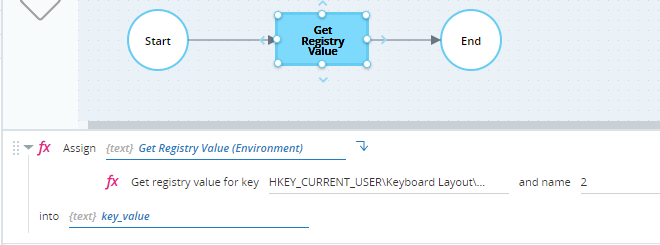
When executed, key_value is set to 0000040d as expected.

Get Value of System Property
Retrieves the value of a specified system property. The following types of system properties are supported:
-
Windows environment variables
The list of supported variables is shown below. The system variable names are not case sensitive.
SYstem Variable
Example Value
ALLUSERSPROFILE C:\Documents and Settings\All Users APPDATA C:\Documents and Settings\gilat\Application Data Show rest of table
SYstem Variable
Example Value
CLIENTNAME Console CommonProgramFiles C:\Program Files\Common Files COMPUTERNAME JSmith ComSpec C:\WINDOWS\system32\cmd.exe FP_NO_HOST_CHECK NO HOMEDRIVE C: HOMEPATH \Documents and Settings\jsmith LOGONSERVER \\FRIDA NUMBER_OF_PROCESSORS 2 OS Windows_NT Path C:\WINDOWS\system32;C:\WINDOWS;
C:\WINDOWS\System32\WbemPATHEXT .COM;.EXE;.BAT;.CMD;.VBS;.VBE;.JS;.JSE;.WSF;.WSH PROCESSOR_ARCHITECTURE x86 PROCESSOR_IDENTIFIER x86 Family 15 Model 2 Stepping 9, GenuineIntel PROCESSOR_LEVEL 15 PROCESSOR_REVISION 0209 ProgramFiles C:\Program Files PROMPT $P$G SESSIONNAME Console SystemDrive C: SystemRoot C:\WINDOWS TEMP C:\DOCUME~1\jsmith\LOCALS~1\Temp TMP C:\DOCUME~1\jsmith\LOCALS~1\Temp USERDNSDOMAIN E-GLUE.COM USERDOMAIN E-GLUE USERNAME jsmith USERPROFILE C:\Documents and Settings\jsmith WINDIR C:\WINDOWS -
Custom system properties
You can create and set the values of custom system properties using Set System Property.
Custom system properties created by Set System Property are created per session only so can only be read using Get System Property in the same session as which they are created.
Parameters
|
Parameter |
Input Type |
Description |
|---|---|---|
|
property name |
Text |
The name of the system property |
Returns
Returns the value of the system property as text.
Example
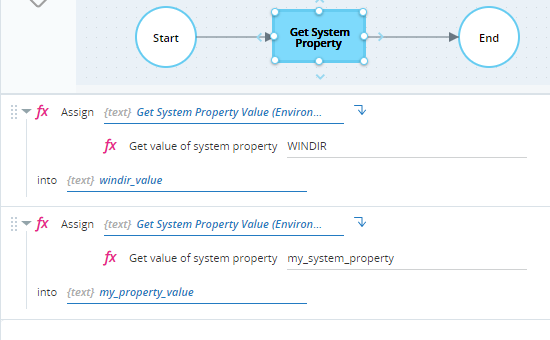
The workflow below retrieves the value of the Windows environment variable WINDIR and stores it in the text variable windir_value. It then retrieves the value of a custom system property my_system_property and stores it in the text variable my_property_value.
Set Value of System Property
Sets the value of a writable system property. You can also create a custom system property and set its value.
Custom system properties created by Set System Property are created per session only so can only be read using Get System Property in the same session as which they are created.
Parameters
|
Parameter |
Input Type |
Description |
|---|---|---|
|
property name |
Text |
The name of the system property to set |
| value | Text | The value to assign to the system property |
Returns
Nothing
Example
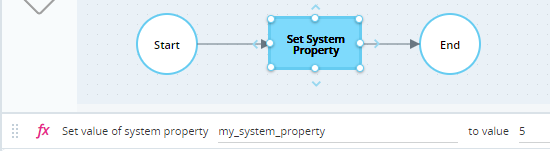
The workflow below creates a custom system property called my_system_property and sets its value to 5.
Properties
The Environment built-in service includes the following read-only properties:
