

MS Outlook
Types
 Outlook Attachment Info
|
Property |
Type |
Description |
|---|---|---|
| ContentType | Text | The MIME type of the attachment content. |
| Id | Text | A unique identifier of the attachment, assigned by the server. This is used in the function Download Attachment to identify the attachment to be downloaded. |
| Is Inline | Boolean |
Indicates if the attachment is an inline attachment or a non-inline attachment. Currently only non-inline attachments are supported, so the value of this property is always False. |
| Name | Text |
A friendly string identifier of the attachment. |
| Size | Number | The size of the attachment, in bytes. |
Outlook Email
|
Property |
Type |
Description |
|---|---|---|
| Attachments Info | List of Outlook Attachment Info |
A list of Outlook Attachment Info, holding the details of the attachments of this email message. |
| Body | Text |
The content of the email message. |
| CC | List of Text | A list of valid email addresses of the CC recipients of the email message. |
| Has Attachments | Boolean | Indicates if the email message has at least one attachment (True), or no attachments (False) (read-only). |
| Id | Text | The ID of the email message, assigned by the Office 365 server (read-only). |
| Is HTML | Boolean | Indicates if the email message content is HTML formatted (True), or not HTML formatted (False) (read-only). |
| Is Read | Boolean | Indicates if the email message has been read (True) or not (False) (read-only). |
| Preview | Text | A text preview of the email message content (read-only). |
| Received DataTime | DateTime | The date and time the email message was received (read-only). |
| Sender | Text | A valid email address of the email message sender (read-only). |
| Sent DateTime | DateTime | The date and time the email message was sent (read-only). |
| Subject | Text | The email message subject. |
| To | List of Text | A list of valid email addresses of the direct recipients of the email message. |
Functions
Get Email
Gets email messages from the user's Outlook 365 mailbox.
| Parameter | type | Description |
|---|---|---|
|
Max Number of Emails |
Number |
The maximum number of email messages to retrieve from the specified folder. The email messages are retrieved from newest to oldest. |
| Folder | Text |
The Outlook folder from which to retrieve the email messages, in '\\{Email Address}\{Root Folder}\{Sub-Folder}\{Sub-Sub-Folder}\...' format. |
| Only Unread | Boolean | Indicates if only unread email messages should be retrieved from the specified folder (True), or if both read and unread email messages should be retrieved (False). |
| Mark As Read | Boolean | Indicates if email messages retrieved from the specified folder should be marked as Read (True), or if Unread email messages should remain marked Unread (False). |
Returns
A list of Outlook Email objects that meet the function criteria.
Get Active Email
Gets active email from the user's Outlook 365 mailbox.
| Parameter | type | Description |
|---|---|---|
| Mark As Read | Boolean | Indicates if email message retrieved should be marked as Read (True), or if Unread email message should remain marked Unread (False). |
Returns
An Outlook Email object of the active email.
Get Accounts
Retrieves a list of the email addresses of all accounts configured in the Outlook application.
Returns
Returns a list of type Text, containing the email addresses.
Set Account
| Parameter | type | Description |
|---|---|---|
|
Account Email |
Text |
The email address of the account to use when sending, forwarding, or replying to emails. |
Returns
Returns a Boolean value of True if the account was set successfully or False if it was not (for example, if the specified email address does not correspond to an account configured in Outlook).
Set Account to Default
Specifies that the default Outlook account must be used when sending, forwarding, or replying to emails. This same account will be used for all sending, forwarding, and replying operations until a different account is specified.
Returns
None
Get Matching Emails
Gets email messages that match the function criteria from the user's Outlook 365 mailbox. Any criterion that is missing or invalid is ignored. Only email messages that meet all the valid criteria are retrieved.
| Parameter | type | Description |
|---|---|---|
|
Max Number of Emails |
Number |
The maximum number of email messages to retrieve from the specified folder. The email messages are retrieved from newest to oldest. |
| Folder | Text |
The Outlook folder from which to retrieve the email messages, in '\\{Email Address}\{Root Folder}\{Sub-Folder}\{Sub-Sub-Folder}\...' format. |
| Sender's Email | Text | A valid email address of the email message sender. This criterion is not supported for release 7.4, and should not be used. |
| Subject | Text | An email message will be retrieved as long as the parameter value appears in the subject line. It does not need to be an exact match. |
| From Date | DateTime | The date range of emails to retrieve. Only email messages sent after this date will be retrieved. |
| To Date | DateTime | The date range of emails to retrieve. Only email messages sent before this date will be retrieved. |
| Mark As Read | Boolean | Indicates if email messages retrieved from the specified folder should be marked as Read (True), or if Unread email messages should remain marked Unread (False). |
Returns
A list of Outlook Email objects that meet the function criteria.
Add Recipient(s) to Outlook Email
Adds recipients to Outlook email.
| Parameter | type | Description |
|---|---|---|
|
Outlook Email |
Outlook Email |
An Outlook Email object. |
| To Email Address(es) | List of Text | A list of valid email address(es) to add to the email message. |
| CC Email Address(es) | List of text | A list of text specifying email address(es) of CC recipients. |
Returns
N/A
Send HTML Email
Sends an email message in HTML format with the specified subject and body to the specified recipients.
| Parameter | type | Description |
|---|---|---|
|
To Email Address(es) |
List of Text |
A list of valid email addresses of the direct recipients to whom to send the email message. |
| Cc Email Address(es) | List of Text | A list of valid email addresses of the CC recipients to whom to send the email message. |
| Subject | Text | The subject of the email message. |
| Body | Text | The textual body of the email message in HTML format. |
Returns
N/A
Send Email
Sends an email message with the specified subject and body to the specified recipients.
| Parameter | type | Description |
|---|---|---|
|
To Email Address(es) |
List of Text |
A list of valid email addresses of the direct recipients to whom to send the email message. |
| Cc Email Address(es) | List of Text | A list of valid email addresses of the CC recipients to whom to send the email message. |
| Subject | Text | The subject of the email message. |
| Body | Text | The textual body of the email message. |
Returns
N/A
Reply Email
Replies to an email message.
| Parameter | type | Description |
|---|---|---|
| CC | List of text | A list of text specifying email address(es) of CC recipients |
|
Outlook Email |
Outlook Email |
An Outlook Email object retrieved using the functions Get Email or Get Matching Emails . |
| Reply All | Boolean | Indicates if the reply should be sent to all the email message recipients (True), or only to the email message sender (False). |
| Reply Text | Text | The reply text, in the same format as the original email. |
Returns
N/A
Send Outlook Email
Sends an email message using a specified Outlook Email object.
| Parameter | type | Description |
|---|---|---|
|
Outlook Email |
Outlook Email |
An Outlook Email object that has at least one valid email address defined in its To property. For details, see Outlook Email . |
Returns
N/A
Forward Email
Forwards an email message.
| Parameter | type | Description |
|---|---|---|
| CC | List of text | A list of text specifying email address(es) of CC recipients |
| Comment | Text | Additional text to include with the forwarded email, in the same format the original email. |
|
Outlook Email |
Outlook Email |
An Outlook Email object retrieved using the functions Get Email or Get Matching Emails . |
| To Email Address(es) | List of Text | A list of valid email address(es) to which to forward the email message. |
Returns
N/A
Get Email Folders
Gets the names of all the Outlook folders for the user. This function does not accept any parameters.
Returns
A list of strings of the Outlook folders for the user, in '\\{Email Address}\{Root Folder}\{Sub-Folder}\{Sub-Sub-Folder}\...' format. For example, '\\john.smith@company.com\Inbox', '\\john.smith@company.com\Deleted Items', '\\john.smith@company.com\Inbox\Manager'. If multiple email accounts are defined, the output will relate to the default account.
Move Email to Folder
Moves an email message from one folder to another.
| Parameter | type | Description |
|---|---|---|
|
Email Id |
Text |
The ID of the email message to move, as specified in the Id property of an Outlook Email object retrieved using the functions Get Email or Get Matching Emails . |
| Folder | Text |
The Outlook folder from which to retrieve the email messages, in '\\{Email Address}\{Root Folder}\{Sub-Folder}\{Sub-Sub-Folder}\...' format. |
Returns
N/A
Mark Email as Read
Marks an email message as Read.
| Parameter | type | Description |
|---|---|---|
|
Email Id |
Text |
The ID of the email message to mark as Read, as specified in the Id property of an Outlook Email object retrieved using the functions Get Email or Get Matching Emails . |
Returns
N/A
Mark Email as Unread
Marks an email message as Unread.
| Parameter | type | Description |
|---|---|---|
|
Email Id |
Text |
The ID of the email message to mark as Read, as specified in the Id property of an Outlook Email object retrieved using the functions Get Email or Get Matching Emails . |
Returns
N/A
Delete Email
Deletes an email message.
| Parameter | Input | Description |
|---|---|---|
|
Email Id |
Text |
The ID of the email message to be deleted, as specified by the Id property of an Outlook Email object retrieved using the functions Get Email or Get Matching Emails . |
Returns
N/A
Download Attachment
Downloads an attachment from an email message.
| Parameter | type | Description |
|---|---|---|
|
Email Id |
Text |
The ID of the email message from which to download the attachment, as specified in the Id property of an Outlook Email object retrieved using the functions Get Email or Get Matching Emails . |
| Attachment ID | Text | The ID of the attachment to be downloaded, as specified by the Id property of an Outlook Attachment Info object. |
| Path | Text | The local path to which to save the attachment. |
| Overwrite | Boolean | Indicates if an existing file with the same name in the specified folder is overwritten. If the value of this parameter is True and a file with the same name exists in the specified folder, it will be overwritten. If the value of this parameter is False and a file with the same name exists in the specified folder, the file will not be overwritten and the function will fail. |
Returns
Returns a Boolean value of True if the attachment is successfully downloaded, otherwise returns False if the attachment cannot be downloaded for any reason.
Create Email Draft
Creates and displays an email draft with advanced configuration options, including importance, sensitivity, reply‑to recipients, voting options, and show confirmation. The email is only prepared and displayed; it is not sent automatically.
Parameters
|
Parameter |
Input Type |
Description |
|---|---|---|
|
subject |
Text |
The subject line of the email message. |
|
to |
Text |
The email addresses to add to the To field of the email. Separate multiple addresses using semi-colons (;). |
|
cc |
Text |
The email addresses to add to the CC field of the email. Separate multiple addresses using semi-colons (;). |
|
bcc |
Text |
The email addresses to add to the BCC field of the email. Separate multiple addresses using semi-colons (;). |
|
content |
Text |
The email body. |
|
attachments |
List of Text |
The list of full paths to each of the files to attach to the email. |
| importance | Text | Sets the email's priority level; like, High, Low, or Normal (default). |
| sensitivity | Text | Sets the email's sensitivity classification; like, Personal, Private, Confidential, or Normal (default). |
| reply to | Text | Specifies an alternate email address where recipients' replies will be directed (e.g., "support@company.com"). |
| voting options | Text | Defines custom voting buttons for recipients to respond with; for example, Yes;No;Maybe or Approve;Reject). |
| show confirmation | boolean |
If true, displays the draft in Outlook for user review before saving. If false, saves directly to the Drafts folder without displaying. |
Returns
Nothing.
Example
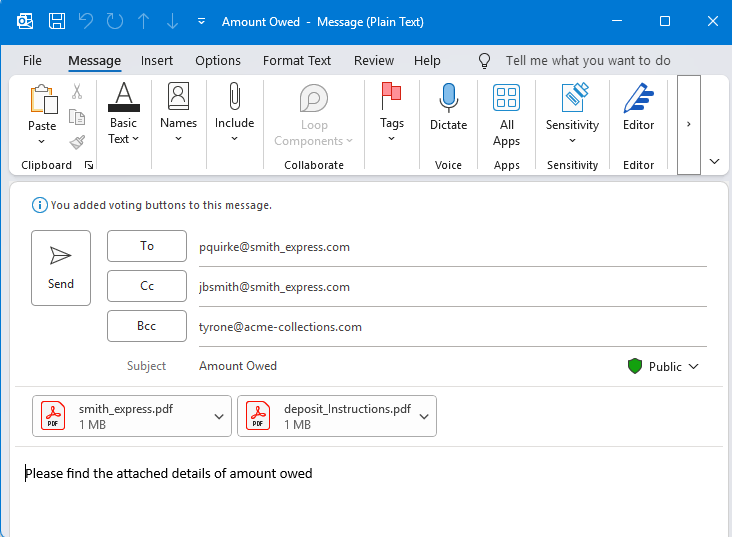
This workflow creates an email. Note that two files will be attached to the email.
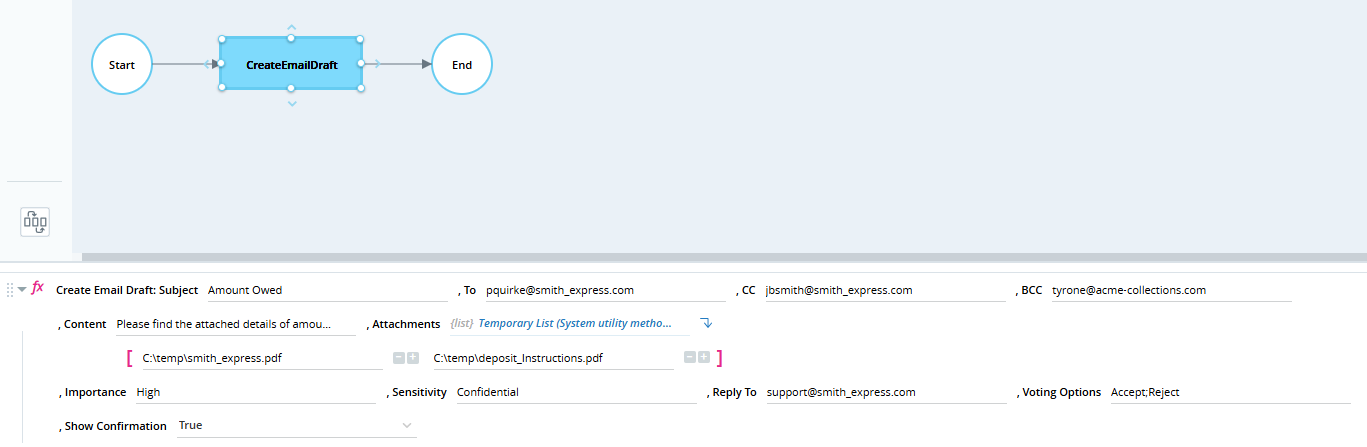
The email is prepared and displayed. It is not sent automatically. When the Show Confirmation parameter is set to True, the draft is displayed for user review; otherwise, it is saved directly to the Drafts folder.
Events
New Email Received
Triggered on receipt of a new email.
